Crypto Payments for Subscriptions: New Flow
Since April 2025 each Chaingateway account pays its subscription to one static crypto address. How the flow works and the GET /api/account response.
Reviewed by Maurice Sobiera
The Chaingateway crypto payment flow, introduced in April 2025, gives every account one static payment address for its subscription. You send crypto to that address to extend the plan, and the end date moves by the amount you send. The endpoint GET /api/account returns the address, the end date and the status.
How does the new flow work?
Open the billing page in the dashboard. It shows the crypto payment address, the subscription end date, the status and the plan. A QR code lets you pay from a mobile wallet.
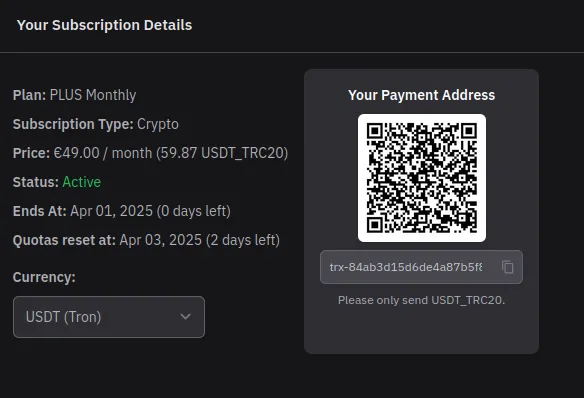
The flow has four rules:
- Every account has one static payment address. You can reuse it for all payments.
- The amount is flexible. The subscription end date adjusts to the amount you transfer.
- You can switch plans immediately. The end date adapts to the price of the new plan, whether it is higher or lower than the old one.
- The payment is processed by the payment provider ForumPay, which Chaingateway has used for crypto payments since 2023 (see Chaingateway teams up with ForumPay).
How do I read my subscription through the API?
Call GET https://app.chaingateway.io/api/account with your API token as a bearer token, as defined in RFC 6750.
curl https://app.chaingateway.io/api/account \ -H "Authorization: Bearer $CHAINGATEWAY_TOKEN"The response in the OpenAPI definition looks like this:
{ "status": 200, "ok": true, "message": "Account info fetched", "data": { "plan": "PLUS", "is_subscribed": "true", "is_yearly": 0, "ends_at": "25-05-03", "quota_reset": null, "status": "active", "payment_method": "crypto", "crypto_payment": { "currency": "USDT_TRC20", "address": "trx-84ab3d15d6de4a87b5f8686b28094f0d", "eur_amount": "49.00", "crypto_amount": "60.04", "qr_code": "https://sandbox.api.forumpay.com/pay/qr/?d=..." }, "quotas_left": { "webhooks": 100000, "addresses": 100000, "requests": 999980, "transactions": 99995 } }}The values are examples from the OpenAPI file, and the QR code URL points to the payment provider’s sandbox. The fields mean:
| Field | Meaning |
|---|---|
plan | The plan name, for example PLUS |
is_subscribed | Whether the account has a subscription |
is_yearly | Whether the plan is billed yearly (0 in the example) |
ends_at | The end date of the paid period |
status | The subscription status, for example active |
payment_method | How the plan is paid, for example crypto |
crypto_payment | Currency, payment address, price in EUR and in the crypto amount, and a QR code URL |
quotas_left | The remaining quota for webhooks, addresses, requests and transactions |
USDT_TRC20 in the example means USDT as a TRC-20 token on Tron, as defined in TIP-20. eur_amount is the plan price in euro, and crypto_amount is the amount to pay in the listed currency.
Where do I get help?
If something does not work as described, contact support. Current plan prices are on the pricing page.
Ready to build this yourself? Get your API key — 7-day trial, no card required — or see the Tron API for the full endpoint reference.